

Getting Going User Guide
Contents
Benefits of registering online
Registering for an Aerospheres website account gives you access to a range of features designed to make ordering products quicker and more convenient.
Once your account has been approved, you will be able to:- View your agreed customer pricing.
- Check real-time stock availability.
- View product shelf life and expiry date information, where applicable.
- Access Safety Data Sheets (SDS) and Technical Data Sheets (TDS).
- Place orders online at any time.
- View your order history and track previous purchases.
- Save products to your Wishlist for future orders.
- Save baskets and Quick Order Forms to speed up repeat purchases.
- Manage your account details and billing information online.
Your website account also provides access to your company-specific purchasing information, helping you place orders quickly and efficiently.
Please note: Some features are only available once your account has been reviewed and approved by Aerospheres.
Registering online
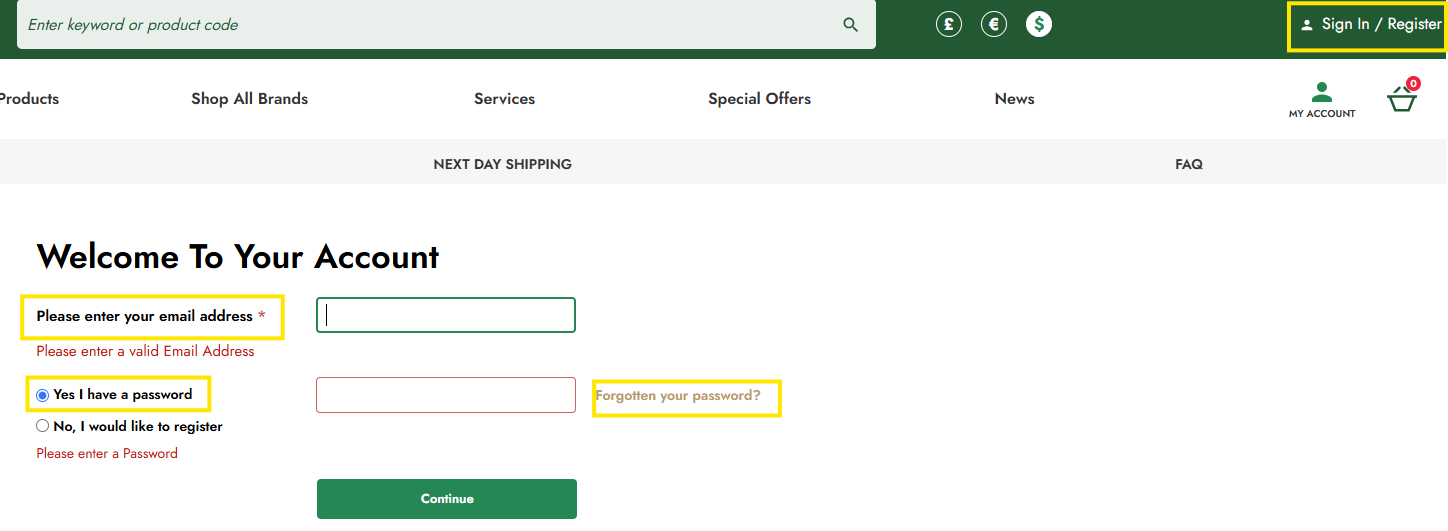
To register for a website account, go to the website and click on the ‘Sign In / Register’ link in the header. This will direct you to the Login / Register page.

Once on the Login / Register page, select the ‘No, I would like to register’ radio button. This will grey out the password field. Enter your email address and then click ‘Continue’ to navigate to the Register page.
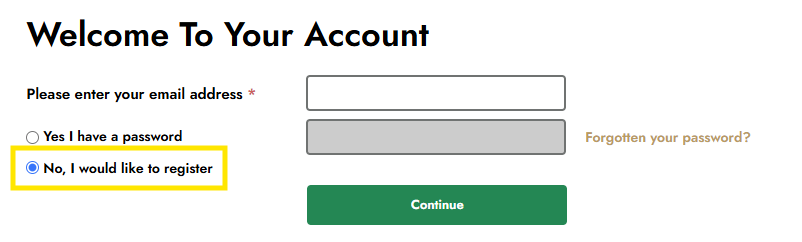
Once you arrive at the Register page, you will see the registration form. Complete all the required fields and then click ‘Register’ to complete the process.
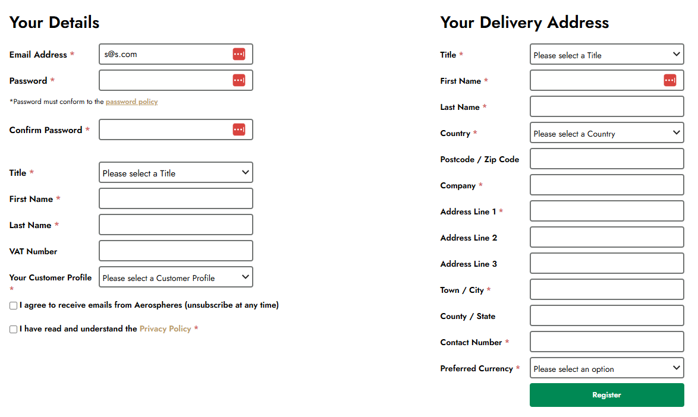
Once you have successfully completed the registration process, you will gain immediate access to the website.
Please note: Once logged in, you will only be able to view prices in the preferred currency you selected during registration. If you need to change this, you will need to contact Aerospheres to request the change.
Please note: Aerospheres will conduct a review of your registration offline. While you will be able to place an order via the website immediately after registration, the order will not be fully processed until this offline check is complete and you are correctly assigned to a company.
Resetting my password
If you have forgotten your password, click on the 'Sign In / Register' link in the website header to navigate to the Login / Register page.
On the Login / Register page, enter your registered email address, ensure the 'Yes I have a password' radio button is selected, and then click the 'Forgotten your password?' link located next to the password field.
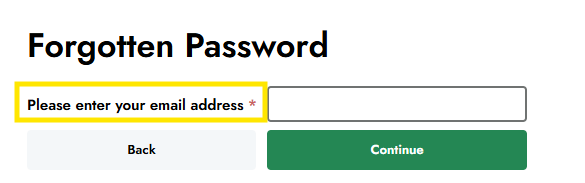
You will be directed to the Forgotten Password page. Enter your registered email address and click 'Submit' to request a password reset.
If the email address is associated with an existing website account, you will receive an email containing a secure link to reset your password. Click the link in the email and follow the on-screen instructions to create a new password.
Once your password has been successfully updated, return to the Login / Register page and sign in using your registered email address and your new password.
Please note: Password reset emails may take a few minutes to arrive. If you do not receive the email, please check your Junk or Spam folder before requesting another reset.
Please note: If you continue to experience issues resetting your password, please contact web.admin@aerospheres.com for further assistance.